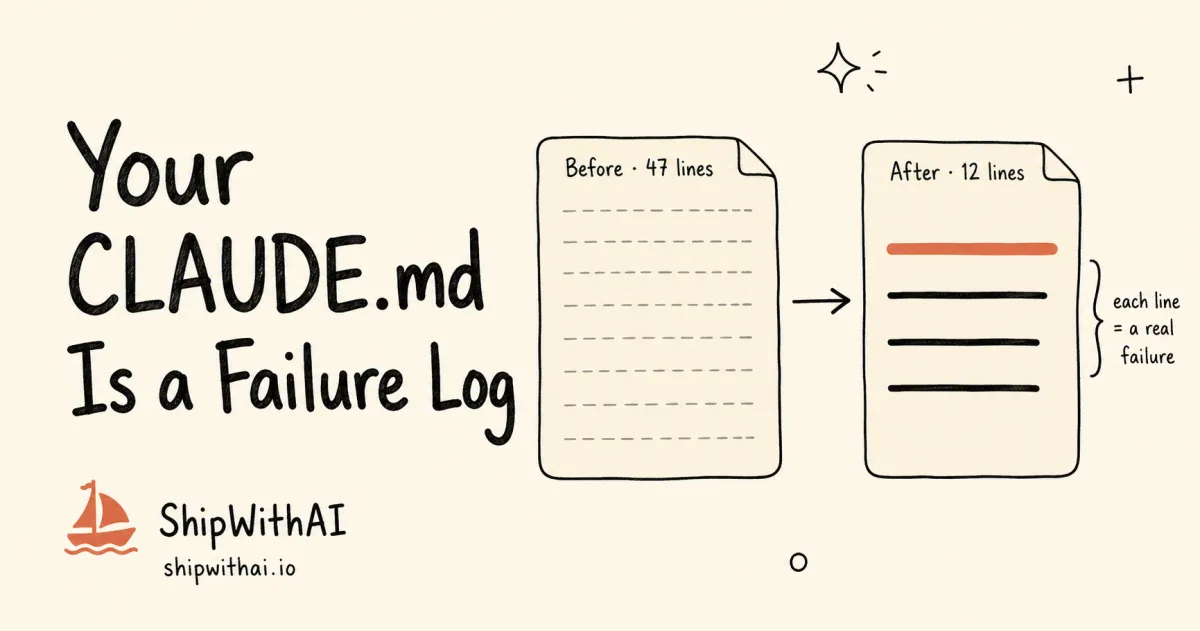
TL;DR - CLAUDE.md instructions get followed ~60-70% of the time. Mitchell Hashimoto’s AGENTS.md in Ghostty has zero aspirational lines, every entry traces to a real agent mistake. Use the Failure-to-Constraint Decision Tree: dangerous actions go to Hooks, repeatable workflows go to Commands, style/convention goes to CLAUDE.md. Jump to the decision tree →
📊 What you’ll build in this post:
- A failure-first workflow for writing CLAUDE.md from scratch
- A decision tree for routing failures to the right layer (CLAUDE.md vs Hook vs Command)
- A Before/After CLAUDE.md transformation you can apply tonight
- A pruning checklist to keep your file under 60 lines
Two CLAUDE.md files. Same project. Different philosophies:
# ❌ Before: instruction-first CLAUDE.md (typical)# 47 lines of well-meaning rules- "Be careful with production database."- "Always write tests."- "Use TypeScript strict mode."- "Follow our naming conventions."# Claude reads these, weighs them against 200K tokens... follows ~65%.
# ✅ After: failure-first CLAUDE.md (Hashimoto method)# 12 lines, each traced to a specific incident- "NEVER use git push --force. Use --force-with-lease."  # Failure: 2026-03-12, force push overwrote teammate's commits on feature/auth- "Run npm test before ANY git commit. No exceptions."  # Failure: 2026-02-28, broken import pushed to main, CI caught 20min later
One file has 47 lines of advice. The other has 12 lines of scars. Which one does the agent actually follow?
The answer isn’t close. The 12-line file wins every time, because every line carries weight. Every line exists for a reason the model can evaluate. The 47-line file is a wishlist. The 12-line file is a harness.
Why do most CLAUDE.md files fail?
Most CLAUDE.md files fail because developers write them like job descriptions: aspirational, comprehensive, bloated. LLMs don’t execute instructions like code executes functions. They weigh each instruction against the full context window. More lines means more dilution, which means lower compliance per line.
The false premise behind most CLAUDE.md files is: “Write clear instructions and Claude will follow them.” That’s not how LLMs work. Instructions compete for attention with every other token in the context window. The more instructions you add, the less each one matters.
The data backs this up. An ETH Zurich study (Gloaguen et al., 2026) tested context files across 138 real GitHub issues and found that LLM-generated agentfiles actually reduced success rates by 0.5-2% while increasing inference costs by 20-23%. Even developer-provided files only improved performance by ~4% on average. The typical developer-written file averaged 641 words across 9.7 sections.
That’s a lot of instructions for a 4% gain.
| Metric | 200-line CLAUDE.md | 40-line CLAUDE.md |
|---|---|---|
| Instructions | ~200 | ~40 |
| Compliance | ~60-70% | ~85-90% |
| Maintenance | Monthly pruning needed | Self-maintaining |
Frontier LLMs can follow approximately 150-200 instructions with reasonable consistency (HumanLayer Blog, 2026). Your 200-line CLAUDE.md already exceeds that budget before counting the system prompt (another ~50 instructions). Community benchmarks put compliance at 60-70% for files over 200 lines. That’s a coin flip for your most important rules.
Think of it like browser tabs. Open 200 tabs and you can’t find anything. Open 12 tabs, each one for a specific task, and you know exactly where everything is.
What is the Mitchell Hashimoto method for AGENTS.md?
Mitchell Hashimoto (creator of Terraform, Vagrant, and now Ghostty) treats AGENTS.md as a failure log, not an instruction file. Every single line in Ghostty’s AGENTS.md exists because the agent made that specific mistake at least once. No line is aspirational. Every line is a scar from a real incident.
In his own words: “Each line in that file is based on a bad agent behavior, and it almost completely resolved them all” (mitchellh.com, 2026).
His philosophy is simple: anytime you find an agent makes a mistake, you take the time to engineer a solution so the agent never makes that mistake again (HumanLayer Blog, 2026). This is harness engineering applied to Layer 1.
The mental model shift matters:
| Instruction-first | Failure-first |
|---|---|
| ”What should the agent do?" | "What has the agent broken?” |
| Proactive, aspirational | Reactive, evidence-based |
| High volume, low signal | Low volume, high signal |
| Added before problems occur | Added after problems occur |
| Dilutes over time | Strengthens over time |
Instructions are wishes. Constraints are lessons. LLMs don’t need more wishes. They need fewer, sharper constraints with concrete context about why each one exists.
How do you build CLAUDE.md from failures instead of imagination?
Start with a minimal CLAUDE.md containing only your project overview and tech stack. Run the agent on real tasks. When it breaks something, convert that failure into a constraint. Then route the constraint to the right layer using the decision tree below.
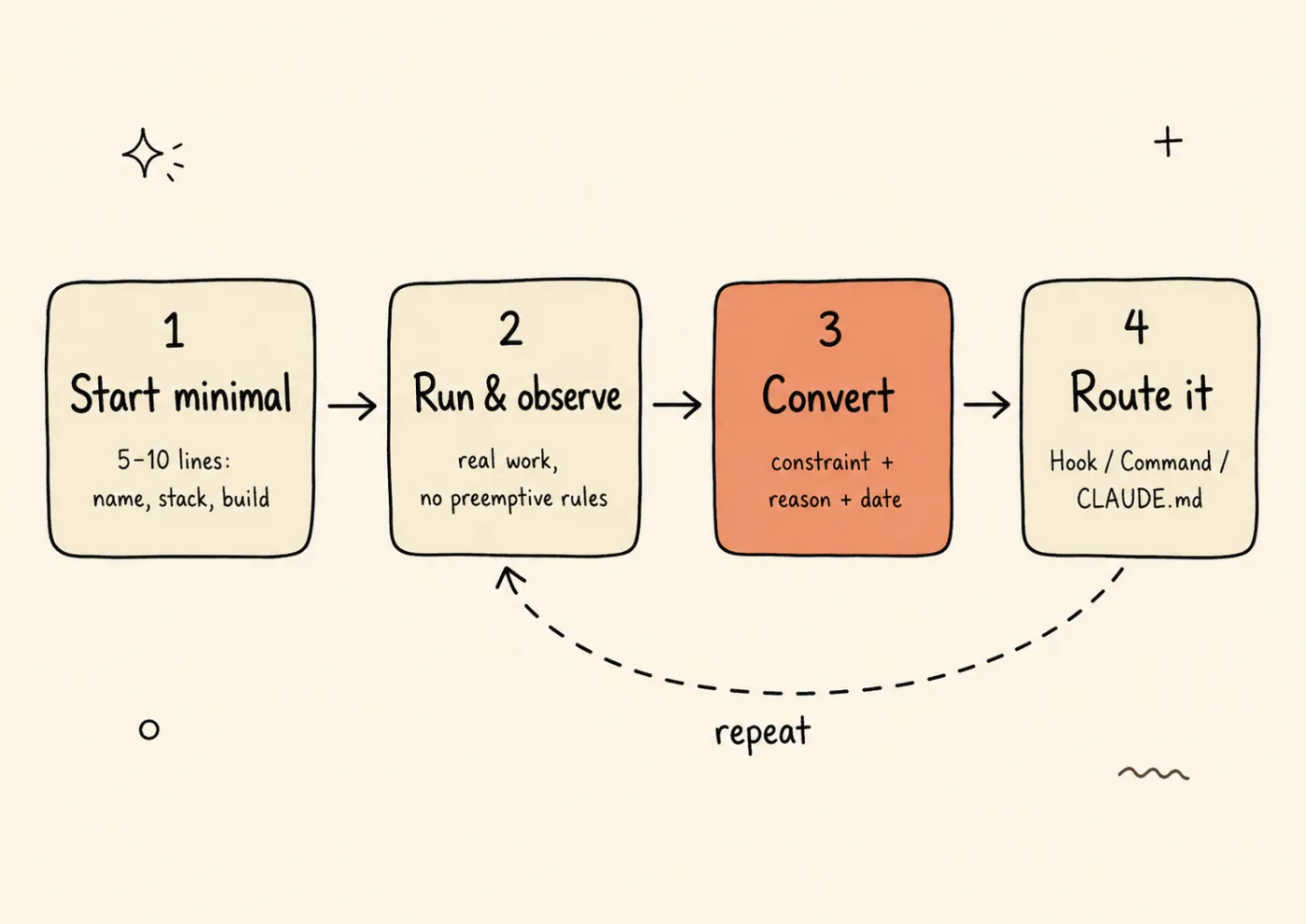
The failure-first loop: start tiny, run the agent, turn each real mistake into a constraint, route it — then repeat on every failure.
Step 1: Start minimal
Your initial CLAUDE.md should be 5-10 lines:
# Project: Acme SaaSTypeScript, Next.js 15, Drizzle ORM, deployed on Vercel.
## Buildnpm run build && npm test
That’s it. No rules. No conventions. No aspirational guidelines. Just enough context for the agent to understand what it’s working on.
Step 2: Run the agent, observe failures
Use the agent for real work. Don’t preemptively add rules. When the agent makes a mistake, write down exactly what happened:
- What: force-pushed to main
- When: 2026-03-12
- Impact: overwrote teammate’s commits on feature/auth
Step 3: Convert the failure into a constraint
Turn the incident into a specific, testable rule:
NEVER use `git push --force`. Use `--force-with-lease`.# 2026-03-12: force push overwrote teammate's commits on feature/authThe pattern is always the same: CONSTRAINT + REASON + FAILURE DATE.
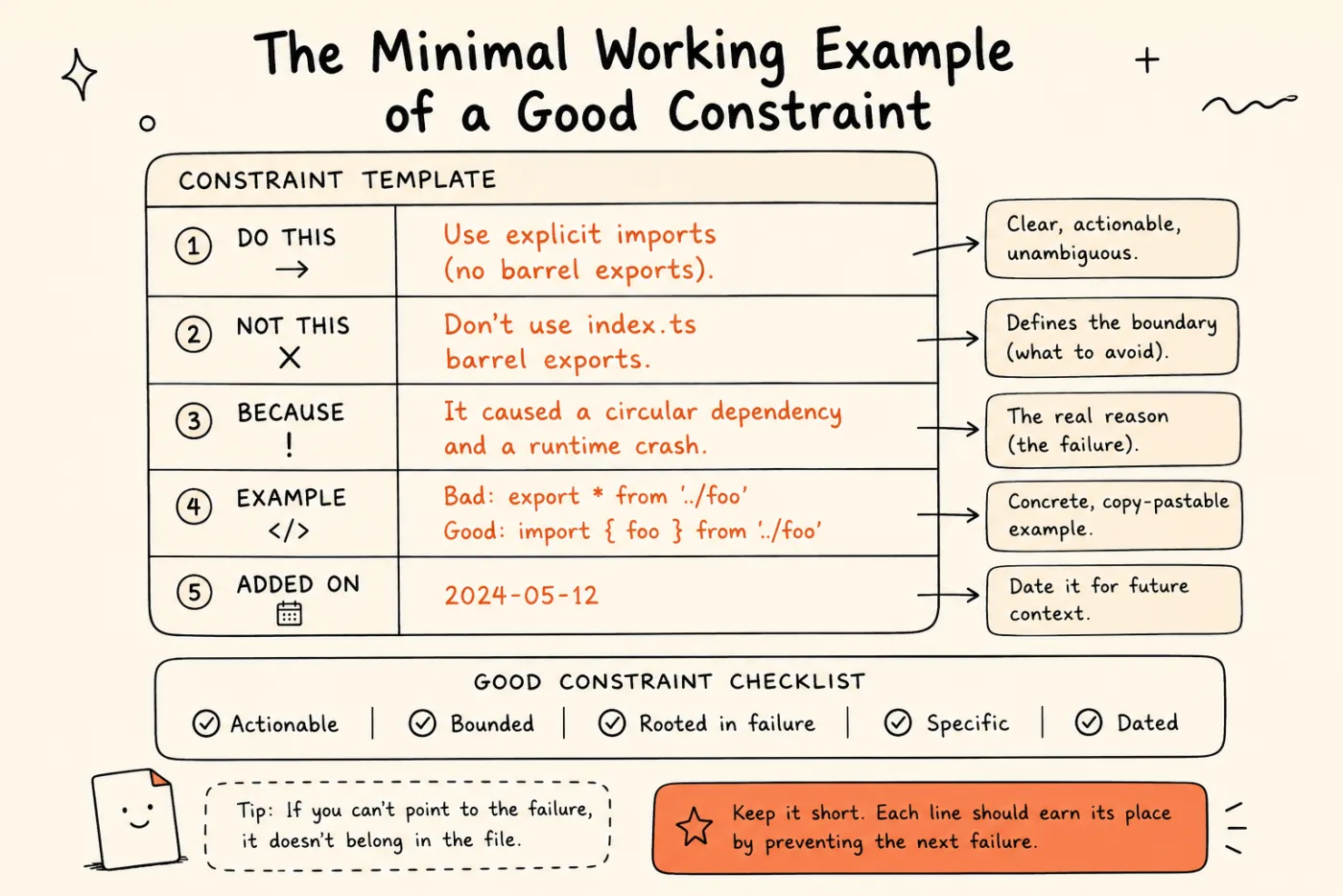
Anatomy of a failure-first constraint: say what to do and what not to do, name the failure that earned it, show an example, and date it. Every line should pay for its place by preventing the next failure.
Step 4: Route it with the decision tree
Not every constraint belongs in CLAUDE.md. This decision tree is the most important takeaway from this post:
Agent made a mistake │ ├── Is the action irreversible or dangerous? │ YES → Hook (PreToolUse block) │ Examples: delete production files, force push, edit .env │ → See: "Which Claude Code Hook Do You Need?" │ ├── Is it a repeatable workflow the agent should automate? │ YES → Command or Skill (.claude/commands/) │ Examples: run tests after refactor, update changelog │ └── Is it a style, convention, or context issue? YES → CLAUDE.md constraint Examples: naming conventions, test patterns, commit formatIf you take one thing from this post, take the decision tree. It replaces the instinct of “something went wrong, let me add a line to CLAUDE.md” with a structured routing decision.
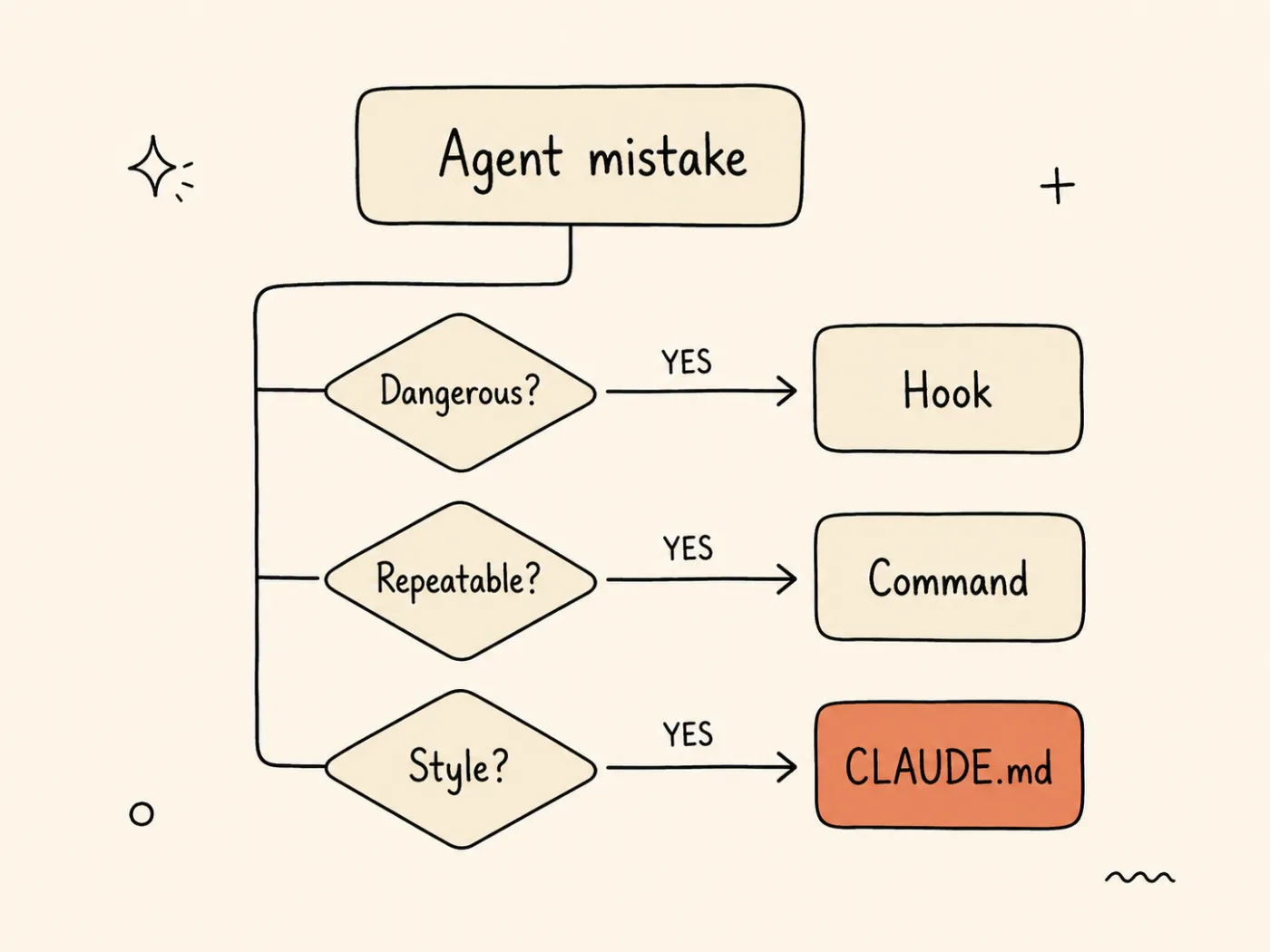
Route every agent failure by its type: dangerous → Hook, repeatable → Command, style/convention → CLAUDE.md. Only the last slice belongs in your memory file.
How do you categorize agent failures into the right layer?
Not every failure belongs in CLAUDE.md. Dangerous actions need Hooks for deterministic enforcement. Repeatable workflows need Commands for automation. Only style and convention issues belong in CLAUDE.md as soft context. Putting dangerous actions in CLAUDE.md is like putting a “please don’t steal” sign instead of a lock.
Category A: Structural failures → Hook
These are the non-negotiables. File deletion, sensitive config edits, force pushes, wrong branch operations. CLAUDE.md compliance is 60-70% for large files. For irreversible actions, you need 100%.
Don’t deep-dive hooks here. Read the full implementation guide: Which Claude Code Hook Do You Need?
Category B: Style and convention failures → CLAUDE.md
Variable naming, comment style, test patterns, git commit message format. These are low-stakes if violated occasionally. The LLM’s soft context handling is fine here.
Write them as failure-derived constraints:
- Use camelCase for variables, PascalCase for components. # 2026-03-20: agent used snake_case in 3 React components, broke style consistency- Test files go in __tests__/ next to the source file, not in a top-level test/ dir. # 2026-02-15: agent created test/api/users.test.ts, missed by our jest configCategory C: Workflow failures → Commands/Skills
“Always run tests after refactor.” “Always update the changelog after API changes.” These are repeatable processes. Don’t remind the agent. Automate it.
Put them in .claude/commands/ where they execute deterministically. A command runs every time. A CLAUDE.md instruction runs when the model remembers it.
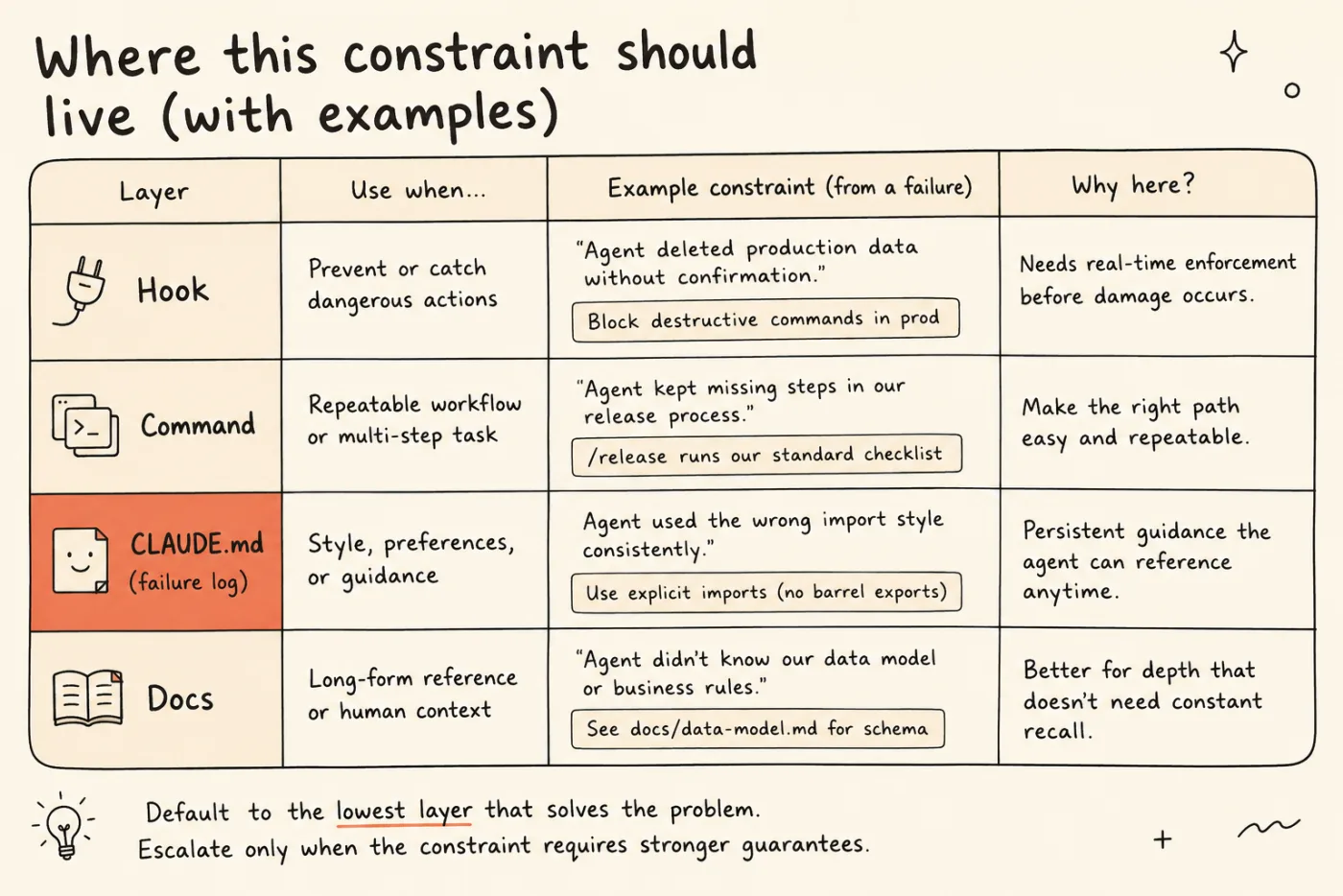
Four homes for a constraint, by how hard it must be enforced: Hooks for dangerous actions, Commands for repeatable workflows, CLAUDE.md for soft guidance, Docs for long-form context. Default to the lowest layer that solves the problem; escalate only when you need a stronger guarantee.
| Layer | Enforcement | Compliance | Example |
|---|---|---|---|
| Hook | Deterministic (shell script) | 100% | Block git push --force |
| Command | Deterministic (executed) | 100% | Run tests after refactor |
| CLAUDE.md | Probabilistic (LLM context) | 60-90% | Use camelCase naming |
For more on how these layers work together, see The Think-Plan-Execute Pattern.
Get weekly Claude Code tips - One email per week. Practical tips, no fluff. Subscribe to AI Developer Weekly →
What does a CLAUDE.md look like before and after the failure-first method?
A failure-first CLAUDE.md is shorter, more specific, and includes provenance for every constraint. Instead of “Be careful with production database,” you write the exact failure, the exact date, and the exact prevention rule.
Before: instruction-first (47 lines)
# Project: Acme SaaS
## Rules- Be careful with production database.- Always write tests.- Use TypeScript strict mode.- Follow naming conventions.- Don't use deprecated APIs.- Keep functions under 50 lines.- Use ESLint and Prettier.- Comment complex logic.- Don't hardcode environment variables.- Use meaningful variable names.# ... 37 more aspirational rules like these
Every line is reasonable. None is specific. The agent reads all 47, retains maybe 30, and consistently follows maybe 25.
After: failure-first (18 lines)
# Project: Acme SaaSTypeScript, Next.js 15, Drizzle ORM, Vercel.
## Buildnpm run build && npm test
## Constraints (each from a real failure)
NEVER use `git push --force`. Use `--force-with-lease`.# 2026-03-12: force push overwrote teammate's commits on feature/auth
Run `npm test` before ANY git commit.# 2026-02-28: broken import shipped to main, CI caught 20min later
Schema migrations: always generate with `drizzle-kit generate`.# 2026-03-05: hand-written migration missed NOT NULL, broke staging
API routes: validate input with zod schemas, never trust req.body.# 2026-03-18: unvalidated input caused 500 errors for 2 hours
18 lines. 4 constraints. Each one backed by a real incident with a date. The agent knows not just what to avoid but why, which makes the constraint stickier in context.
The force-push constraint? That one should actually graduate to a Hook for 100% enforcement. But even in CLAUDE.md, the failure context makes it far more likely to be followed than “be careful with git.”
Try it now: Open your CLAUDE.md right now. For each line, write the specific failure that caused you to add it. If you can’t name the incident, delete the line. Then check: should any of the remaining constraints be a Hook instead? Move those to
.claude/settings.json.
I did this exercise on a 90-line CLAUDE.md last month. It dropped to 23 lines. The agent’s compliance on the remaining rules went up noticeably within the first session. Fewer rules, better followed.
How do you keep CLAUDE.md lean over time?
Prune monthly. If a constraint hasn’t triggered in 3 months, consider removing it. If a constraint graduated to a Hook, remove it from CLAUDE.md. HumanLayer’s production CLAUDE.md is under 60 lines. Bloat is the number one killer of CLAUDE.md effectiveness.
Here’s the pruning checklist I run monthly:
For each constraint in CLAUDE.md, ask:
1. Has the agent triggered this constraint in the past 3 months?   NO → candidate for removal
2. Has this constraint graduated to a Hook?   YES → remove from CLAUDE.md (now enforced, not suggested)
3. Is this a workflow that could be a Command instead?   YES → move to .claude/commands/, remove from CLAUDE.md
4. Can I name the specific failure behind this line?   NO → delete it (it's aspirational, not evidence-based)
5. Does the agent already do this correctly without the instruction?   YES → delete it (you're wasting instruction budget)
The bloat trap is real. On a team, every developer adds lines. Nobody removes them. Three months later, you have a 300-line file and you’re back to square one.
Run a pruning session once a month. Ask Claude: “Which of these constraints did you encounter this month?” The ones it never encountered are candidates for removal.
Constraints that prove critical over multiple incidents should graduate. Move them to a Hook where enforcement is deterministic. Then remove them from CLAUDE.md. A constraint enforced by a Hook doesn’t need to also live in CLAUDE.md (the Hook will block the action regardless).
Build your .claude/ setup the right way. Be first to get the .claude/ Template Repo when it drops. Join the waitlist →
FAQ
What is the difference between CLAUDE.md and AGENTS.md?
CLAUDE.md is Claude Code’s project-level instruction file, loaded automatically at session start. AGENTS.md is an emerging open standard backed by OpenAI Codex, Amp, Google Jules, and Cursor that serves the same purpose but is agent-agnostic. Both are repository-level context files. If you use Claude Code, write CLAUDE.md. If you want cross-agent compatibility, also add an AGENTS.md. The failure-first methodology in this post applies to both.
Should I start CLAUDE.md from scratch or use a template?
Start from scratch with only three things: project name, tech stack, build commands. Then build it through the failure-first workflow: run the agent, observe mistakes, add constraints one at a time. Templates encourage instruction-first thinking, which is the exact problem this post addresses. If you must use a template, use it only for the project overview section, never for constraints.
Can the agent override or ignore CLAUDE.md constraints?
Yes. CLAUDE.md is “soft” context. The LLM weighs it against other context but can ignore it. Compliance runs 60-70% with large files, higher with lean files. For constraints that must be followed 100% of the time (dangerous actions, security rules), use Hooks instead. Hooks run as shell scripts and physically block the action. The model cannot bypass them.
How many lines should CLAUDE.md have?
As few as possible. HumanLayer’s production CLAUDE.md is under 60 lines. Research suggests LLMs follow ~150-200 instructions consistently, but that budget is shared with the system prompt (~50 instructions). Aim for 30-60 lines of failure-derived constraints plus a minimal project overview. If your file exceeds 100 lines, audit it with the failure-first test: can you name the specific incident behind each line?
What to Read Next
- Harness Engineering: The System Around AI Matters More Than AI - The 5-layer framework that puts CLAUDE.md in context. Layer 1 is memory. This post goes deep on building Layer 1 the right way.
- Which Claude Code Hook Do You Need? A Decision Guide - When the decision tree sends you to Hooks (Category A failures), this guide shows you which hook type to pick and how to implement it.
- Claude Code Harness: 5 Layers Beyond CLAUDE.md - The full layer-by-layer setup guide. Once your CLAUDE.md is lean and failure-driven, build out the other 4 layers.


