TL;DR - Claude Code’s Stop hook blocks the agent from finishing until verification passes. Combine it with PostToolUse feedback injection to build a 3-layer verification loop (syntax, intent, regression) in 20 minutes. Jump to the full setup →
📊 What this post builds:
- A 3-layer verification system using 2 hook events and 3 handler types
- Copy-paste Stop hook with anti-loop protection (
stop_hook_active)- Complete
.claude/settings.jsonconfig combining all layers- An end-to-end walkthrough: one pagination task, all three layers firing
- ROI breakdown: verification costs tokens, skipping it costs 7 hours/week
Two hook setups. Same Claude Code session. Different outcomes:
# What most devs have: a formatting hook# PostToolUse: runs prettier after file editsjq -r '.tool_input.file_path' | xargs npx prettier --write
# What this post builds: a verification loop# PostToolUse: checks syntax on every file change# Stop: blocks completion until tests pass + intent verified# Result: agent can't say "done" until it actually is
The first catches formatting. The second catches logic errors, missed requirements, and broken tests before the agent claims it’s finished. The second setup is what this post builds — but first, why the formatting-only kind isn’t enough.
Why do you need a verification loop?
Because “done” is a claim, not a checked result. You ask Claude Code for a change, it edits four files, reports success, and stops. You run the code: one test broken, one requirement missing. The agent didn’t lie — it just had no mechanism forcing it to check.
The trust numbers reflect this: only 3% of developers report high trust in AI-generated code (Qodo, State of AI Code Quality, 2025). And the cost is measurable: teams lose an average of 7 hours per week per engineer to AI-related inefficiency, much of it rework on code that was declared finished (Exceeds AI, 2026).
This is not a model problem. It’s a missing-feedback problem. In a default Claude Code session, nothing runs between “the agent stops typing” and “you accept the result” — every check is manual, so every miss is yours to catch. A verification loop moves those checks into the session itself, where the agent has to pass them before it’s allowed to finish.
LangChain’s PreCompletionChecklistMiddleware is the most documented example of this pattern. It contributed to a 13.7-point benchmark gain using harness changes alone. This post builds the Claude Code equivalent using hooks. For where this verification loop fits in the larger Claude Code stack, see our complete Claude Code guide. But before you copy any config, one thing needs pinning down: what exactly does “verification” check?
What does “verification” actually mean for an AI coding agent?
Verification means checking that the agent’s output matches the task’s intent, not just that the code compiles. Most developers stop at syntax checks (lint, format, type-check). Production verification needs two more layers.
Three verification layers, each catching a different class of failure:
| Layer | Checks | Catches | Misses | Hook |
|---|---|---|---|---|
| 1. Syntax | Code compiles, formats | Typos, type errors | Logic bugs | PostToolUse command |
| 2. Intent | Output matches request | Wrong approach, missing features | Regressions | Stop prompt/agent |
| 3. Regression | Existing tests pass | Broken functionality, side effects | Untested requirements | Stop command |
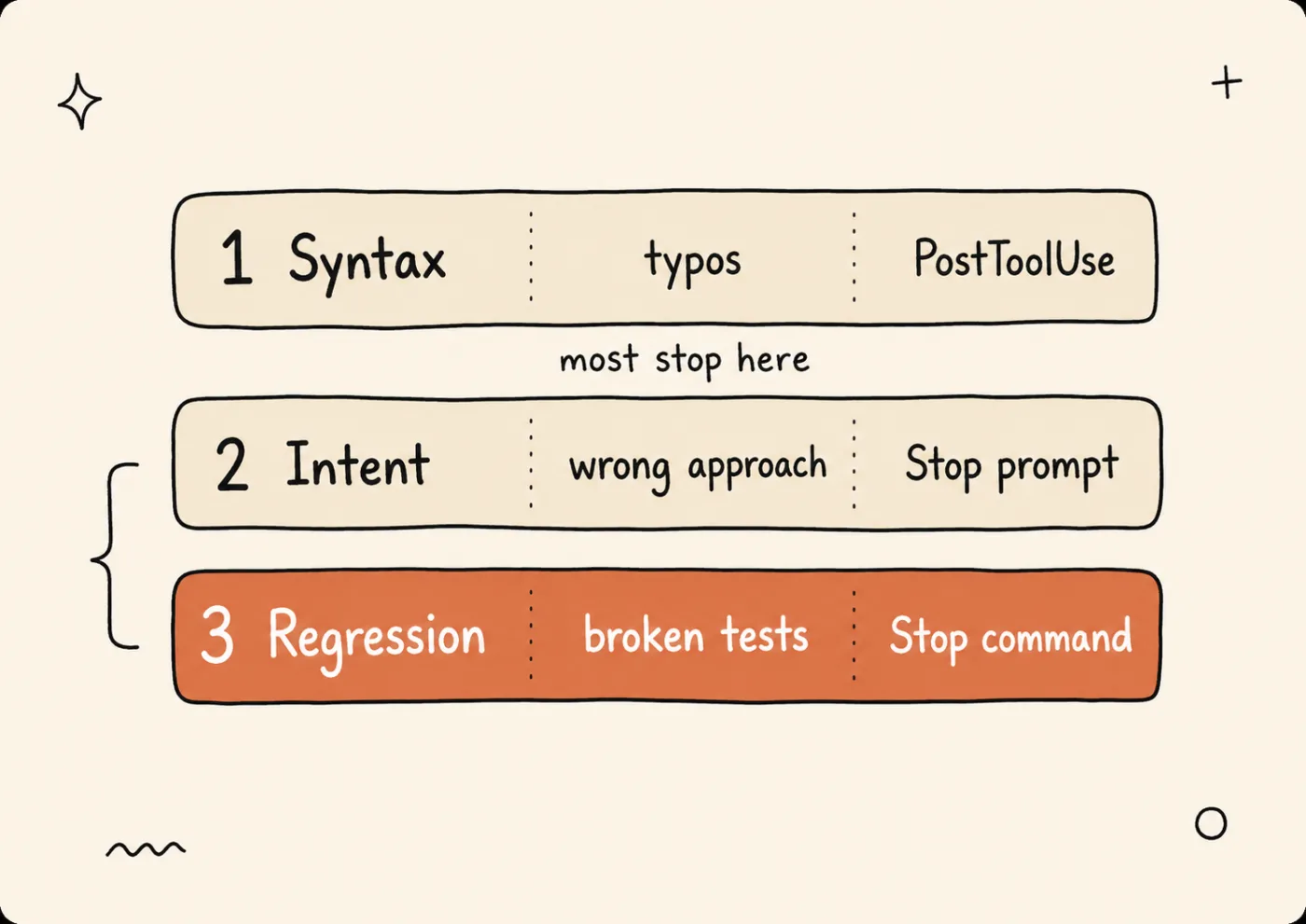
Three verification layers: each catches a different class of failure, each maps to a specific Claude Code hook event.
“Run the tests” only covers Layer 3. Tests verify what you wrote tests for, not what you asked the agent to do. If you asked Claude to add pagination and it added sorting instead, every test still passes. Layer 2 catches that.
Spotify’s Honk system demonstrates this at scale: 1,500+ PRs merged through verification loops, handling roughly 50% of all PRs automatically (Spotify Engineering, Dec 2025). Their key design choice: the agent doesn’t know how verification works. It just gets pass/fail feedback. That separation keeps the agent focused on the task, not on gaming the verifier.
Two of the three layers in the table — Intent and Regression — stand on the same Claude Code mechanism: the Stop hook. It’s worth understanding properly before you write your first line of config.
How does Claude Code’s Stop hook work?
The Stop hook fires every time Claude finishes responding. Exit code 2 blocks Claude from stopping and forces it to continue working. This single mechanism prevents the agent from saying “done” when it isn’t (Claude Code docs). Four handler types are available for Stop hooks. For a full comparison, see the Hook Decision Guide.
Here’s the critical part most tutorials skip: the stop_hook_active field.
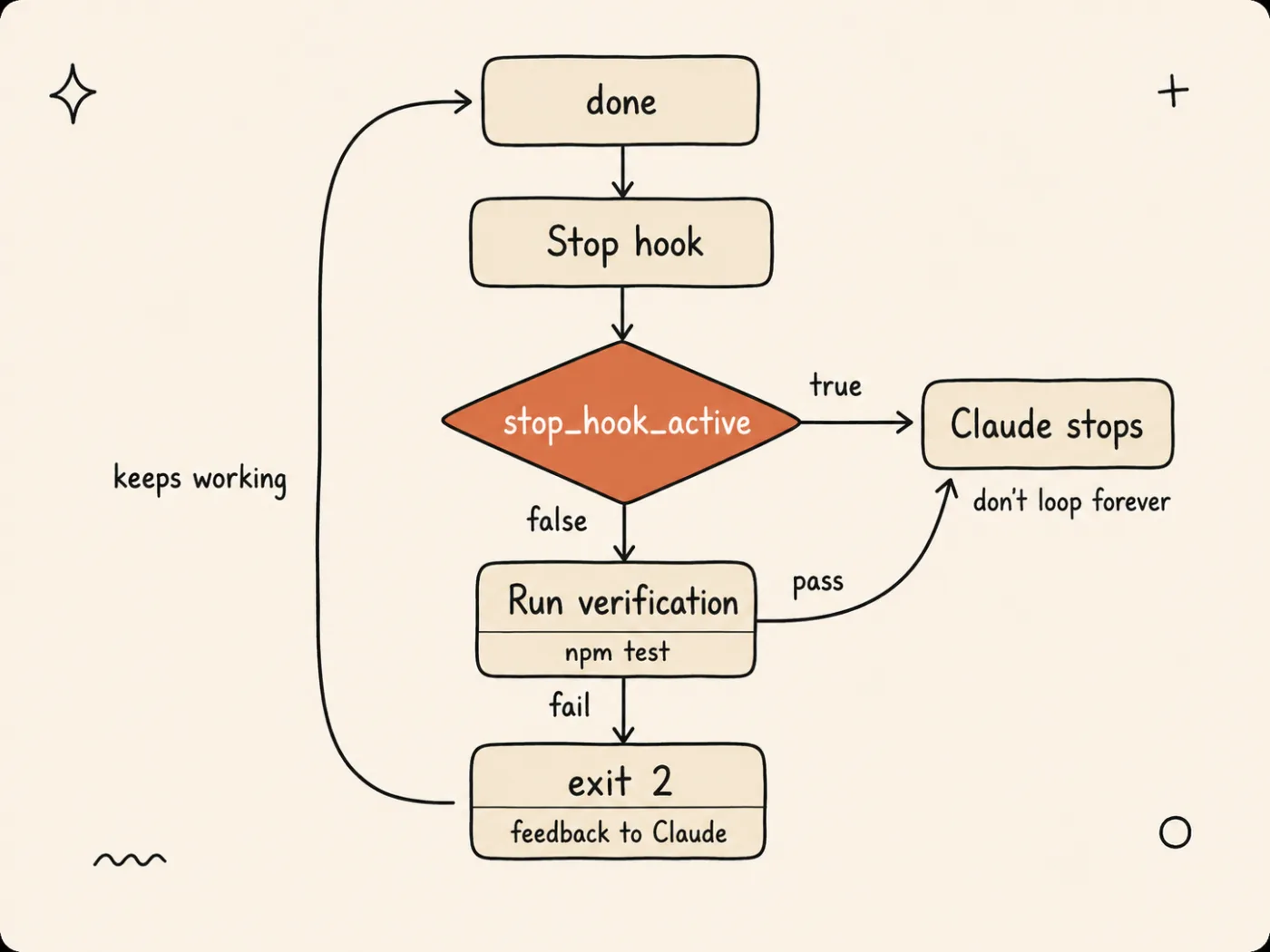
Exit code 2 sends Claude back to work instead of letting it finish; the stop_hook_active guard is what keeps that from becoming an infinite loop.
#!/bin/bashINPUT=$(cat)
# CRITICAL: prevent infinite verification loops# When true, Claude is already in a forced-continuation stateif [ "$(echo "$INPUT" | jq -r '.stop_hook_active')" = "true" ]; then  exit 0  # Let Claude stop — don't loop foreverfi
# Run tests — block stop if they failnpm test 2>&1 || {  echo "Tests failing. Fix before completing." >&2  exit 2}
exit 0
Without checking stop_hook_active, the hook blocks every stop attempt. Claude fixes the tests, tries to stop, gets blocked again, fixes more, tries to stop, gets blocked again. Infinite loop. Always check this field.
The Stop hook input JSON looks like this:
{ "session_id": "abc123", "transcript_path": "/path/to/transcript.jsonl", "cwd": "/your/project", "hook_event_name": "Stop", "stop_hook_active": false}Blocking is only half the mechanism — feedback is the other half. There are two ways to send it back to the model:
- Exit 2 + stderr: The stderr message appears as feedback. Claude reads it, acts on it, then tries to stop again.
- Exit 0 + JSON with
additionalContext: Inject context into the agent’s next turn without blocking. Good for warnings that don’t require immediate action.
Feedback via additionalContext is capped at 10,000 characters. If your test output is longer, filter it. HumanLayer learned this the hard way: 4,000 lines of passing tests flooded the context window and the agent lost track of the task. Surface failures only.
How do you build a 3-layer verification loop?
Once the mechanism is clear, the rest is assembly: three hooks across two events — a PostToolUse command hook for syntax (Layer 1), a Stop command hook for regression (Layer 3), and a Stop prompt hook for intent (Layer 2). Each runs automatically. The agent gets feedback and self-corrects. This is a concrete harness engineering example, applying Layer 4 of the 5-layer harness to verification instead of just guardrails.
Layer 1: Syntax verification (PostToolUse)
Runs after every Write or Edit tool call. Checks lint and type errors on the changed file. Fast, deterministic, zero tokens.
#!/bin/bashINPUT=$(cat)FILE_PATH=$(echo "$INPUT" | jq -r '.tool_input.file_path // empty')
# Skip non-JS/TS filesif [[ ! "$FILE_PATH" =~ \.(ts|tsx|js|jsx)$ ]]; then  exit 0fi
The guard clause exits early for non-JS files. The lint check runs on everything else:
# Run ESLint on the changed file, surface errors onlyLINT_OUTPUT=$(npx eslint "$FILE_PATH" --quiet 2>&1)LINT_EXIT=$?
if [ $LINT_EXIT -ne 0 ]; then  echo "{\"additionalContext\": \"Lint errors in $FILE_PATH:\\n$LINT_OUTPUT\"}"  exit 0fi
exit 0
The key detail: this hook returns exit 0, not exit 2. PostToolUse hooks can’t undo the file write. Instead, the additionalContext field injects the lint errors into Claude’s next turn. Claude sees the errors and fixes them on its own.
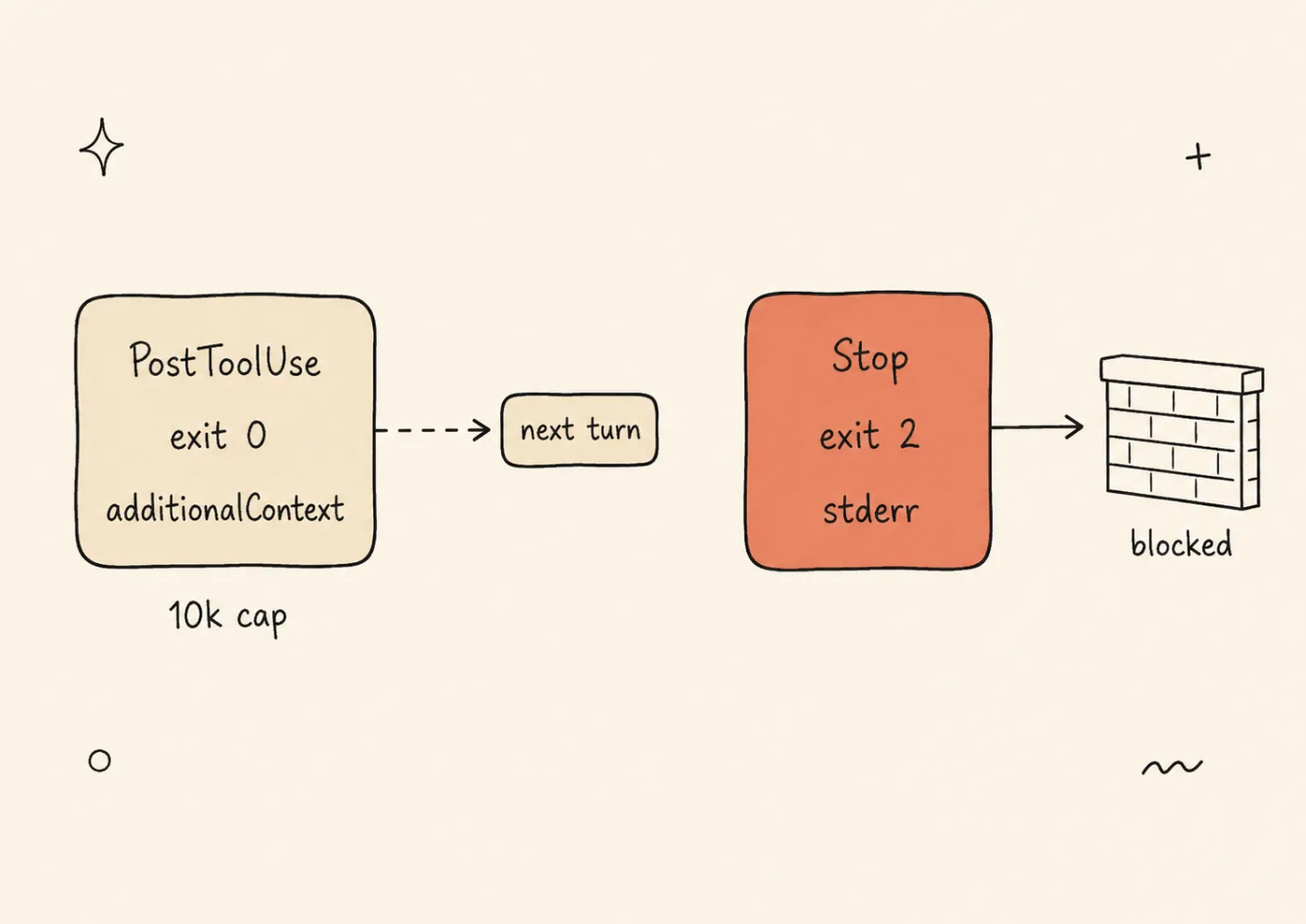
PostToolUse can only whisper into the next turn; Stop can slam the door. Choose the channel by whether the agent must act now.
Swallow success output. Only surface failures. If every passing lint check dumps output into context, you’re burning tokens on noise.
Layer 2: Intent verification (Stop prompt hook)
Runs when Claude tries to stop. Asks an LLM to check whether the original request was actually addressed. This is the Claude Code equivalent of LangChain’s PreCompletionChecklistMiddleware.
{ "type": "prompt", "prompt": "Review what was accomplished in this session. Check if all requirements from the user's original request were addressed. If anything is incomplete or missing, respond with {\"decision\": \"block\", \"reason\": \"Incomplete: <what remains>\"}. If everything looks complete, respond with {\"decision\": \"allow\"}."}For complex tasks, swap the prompt hook for an agent hook. Agent hooks spawn a subagent that can Read files, Grep the codebase, and run Bash commands. More thorough, but adds 2-10 seconds.
{ "type": "agent", "prompt": "Verify the work is complete. Read the modified files. Check that the changes match the user's request. Run the test suite. If anything is missing or broken, explain what needs fixing.", "timeout": 120}Layer 3: Regression verification (Stop command hook)
Runs when Claude tries to stop, on the same event as Layer 2 — but this check is deterministic: do the tests pass? Does the build succeed?
#!/bin/bashINPUT=$(cat)
# Anti-loop protection, MANDATORYif [ "$(echo "$INPUT" | jq -r '.stop_hook_active')" = "true" ]; then  exit 0fi
# Run testsTEST_OUTPUT=$(npm test 2>&1)if [ $? -ne 0 ]; then  TRIMMED=$(echo "$TEST_OUTPUT" | tail -50)  echo "Tests failing. Fix before completing:\\n$TRIMMED" >&2  exit 2fi
If tests pass, check the build too:
# Run build (continuation of verify-regression.sh)BUILD_OUTPUT=$(npm run build 2>&1)if [ $? -ne 0 ]; then  TRIMMED=$(echo "$BUILD_OUTPUT" | tail -30)  echo "Build failing:\\n$TRIMMED" >&2  exit 2fi
exit 0
The complete configuration
With all three handlers defined, the last step is wiring them together — all three layers in one .claude/settings.json. The PostToolUse hook handles syntax (Layer 1):
{ "hooks": { "PostToolUse": [ { "matcher": "Write|Edit", "hooks": [ { "type": "command", "command": "bash .claude/hooks/verify-syntax.sh" } ] } ] }}The Stop hooks handle regression (Layer 3) and intent (Layer 2), in that order:
{ "hooks": { "Stop": [ { "hooks": [ { "type": "command", "command": "bash .claude/hooks/verify-regression.sh" }, { "type": "prompt", "prompt": "Review what was accomplished. Check if all requirements from the user's original request were addressed. If incomplete, respond with {\"decision\": \"block\", \"reason\": \"<what remains>\"}. If complete, respond with {\"decision\": \"allow\"}." } ] } ] }}Stop hooks run in definition order. Put the fast command hook (Layer 3) first. If tests fail, there’s no point running the slower prompt hook (Layer 2). The command hook blocks, Claude fixes, and only when tests pass does the prompt hook evaluate intent.
Boris Cherny, creator of Claude Code, reports that verification feedback loops improve quality 2-3x: “Give Claude a way to verify its work. If Claude has that feedback loop, it will 2-3x the quality of the final result” (X thread, 2026).
Of course, that improvement isn’t free — the remaining question is what it costs.
Get weekly Claude Code tips - Real configs, not theory. One email per week. Subscribe to AI Developer Weekly →
What’s the cost of running verification hooks?
Verification hooks add roughly 10-20% token overhead per session, primarily from the prompt/agent Stop hooks. Command hooks cost zero tokens and under 5 seconds of wall time. But skipping verification costs significantly more: teams lose an average of 7 hours per week per engineer to AI-related inefficiency, and AI code rework rates hit 20-30% when AI-generated code exceeds 40% of the codebase (Exceeds AI, 2026).
| Without Verification | With Verification | |
|---|---|---|
| Token cost per session | Baseline | +10-20% |
| Rework rate | 20-30% | ~5-10% (estimated) |
| Time lost per week | ~7 hours | ~2-3 hours (estimated) |
| “Done” means done | Sometimes | Almost always |
The rework reduction estimates are directional, not from a controlled study. But the math works in your favor even conservatively. If a failed task costs 30 minutes of rework, and verification prevents one failure per day, you save 2.5 hours per week for roughly 500 extra tokens per session.
There’s also a perception problem. Developers perceive +20% speed from AI tools but experience -19% actual speed on complex tasks (Exceeds AI, 2026). That gap is rework hiding behind perceived productivity. Verification closes it by catching problems at step N instead of step N+5.
You don’t need all 3 layers at once. Among harness engineering best practices, starting with one layer beats planning all three. Layer 3 alone (the test-runner Stop hook) is the highest-ROI single addition. It’s 15 lines of bash, costs zero tokens, and catches the most common failure: the agent says “done” while tests are broken.
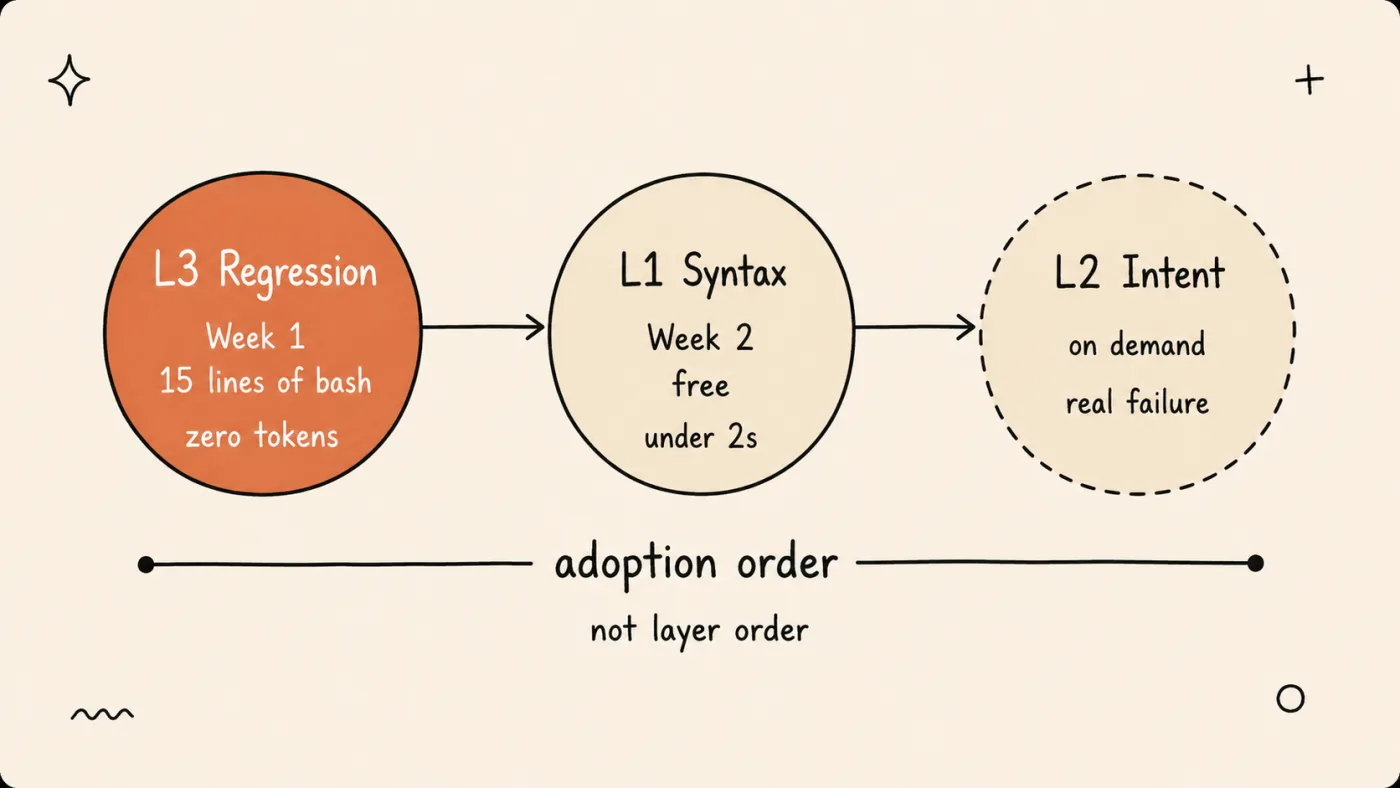
Adopt in the order 3 → 1 → 2: start with the test-runner Stop hook, add syntax next, and add intent checking only after a real intent failure.
When should you use each verification layer?
Past the adoption order, the question is fit: use Layer 1 (syntax) always — it’s free, catches the obvious, and runs in under 2 seconds. Use Layer 3 (regression) when your project has a test suite. It’s the highest-ROI single hook. Use Layer 2 (intent) for complex or multi-step tasks where the agent might solve the wrong problem entirely.
| Scenario | Layer 1 (Syntax) | Layer 2 (Intent) | Layer 3 (Regression) |
|---|---|---|---|
| Prototyping | Yes | No | No |
| Solo dev, daily work | Yes | No | Yes |
| Team project | Yes | Yes (prompt) | Yes |
| Production hotfix | Yes | Yes (agent) | Yes |
How to adopt gradually:
- Week 1: Add the Layer 3 Stop hook (test runner). Copy the
verify-regression.shscript above. This single hook catches the most common failure mode. - Week 2: Add the Layer 1 PostToolUse hook (syntax). Copy
verify-syntax.sh. Now lint errors get fixed automatically instead of piling up. - When you hit an intent failure: Add the Layer 2 prompt hook. You’ll know you need it when Claude completes a task that passes all tests but doesn’t match what you asked for.
This follows the failure-first method: add constraints after real failures, not before imagined ones.
Try it now:
- Copy
verify-regression.shinto.claude/hooks/- Add the Stop hook config to your
.claude/settings.json- Make it executable:
chmod +x .claude/hooks/verify-regression.sh- Ask Claude to make a code change, then check if the Stop hook fires when tests fail
- Confirm the agent fixes the issue before completing
What does the loop look like on a real task?
The checklist above is theory — here’s how the loop plays out on a typical request, with all three layers from the configuration above active. The task: “Add pagination to GET /api/posts — default page size 20.”
Turn 1 — Layer 1 speaks up. Claude edits src/api/posts.ts and leaves an unused offset variable behind. The PostToolUse hook runs ESLint on the file and injects the error into the next turn via additionalContext. Claude removes the variable without being asked. No block, no drama — the fix happens mid-task.
Turn 4 — Layer 3 blocks. Claude finishes the endpoint and tries to stop. The Stop command hook runs npm test: two contract tests fail because the response shape changed (posts moved under data). Exit 2 sends the trimmed failures back through stderr. Claude reads the output, fixes the serializer, and reruns.
Turn 5 — Layer 2 blocks. The stop_hook_active guard waves the command hook through — Claude already reran the tests after the serializer fix — and the prompt hook compares the result against the request: “default page size 20” — Claude hard-coded 10. The hook returns {"decision": "block", "reason": "Incomplete: default page size is 10, request specified 20"}. Claude fixes the constant and adds a test for it.
Turn 6 — the loop lets go. Claude stops again. The intent check returns {"decision": "allow"}, and — as on every stop attempt since the first block — stop_hook_active keeps the command hook from re-running. The agent reports done, and this time it’s true.
Total overhead: three extra turns and a few hundred tokens. Without the loop, all three misses land in code review — or in production. That trade — a few hundred tokens against three shipped misses — is the argument in miniature.
Conclusion
A verification loop turns “done” from a claim into a checked result. The three layers split the work: PostToolUse catches syntax as files change, the Stop command hook catches regressions before the agent finishes, and the Stop prompt hook catches what tests can’t see — solving the wrong problem.
Don’t build all three this week. Start with the 15-line test-runner Stop hook: it’s the highest-ROI single addition and it blocks the most common failure, “done” with broken tests. Add the syntax layer next, and intent checking after your first real intent failure. Whatever you add, guard every Stop hook with stop_hook_active.
The bigger pattern: Agent = Model + Harness. The model already writes the code; the harness is what makes its “done” trustworthy. Verification is the harness layer with the most leverage — start there, then build out the rest of the harness engineering stack.
Build your harness, not just your prompts. Verification is one layer. The full system includes memory, tools, permissions, and observability. Subscribe to AI Developer Weekly →
FAQ
What is a self-verification loop in Claude Code?
A self-verification loop is a system of hooks that automatically checks Claude Code’s output at multiple levels (syntax, intent, regression) before allowing the agent to finish. It uses PostToolUse hooks for per-file checks and Stop hooks for task-completion verification. The agent receives feedback and self-corrects without manual review. This is the Claude Code equivalent of LangChain’s PreCompletionChecklistMiddleware.
Does verification slow down Claude Code?
Command hooks add under 5ms. Prompt hooks add 300-2000ms per Stop event. Agent hooks add 2-10 seconds. These fire once when Claude tries to stop, not on every tool call. The overhead is minimal compared to the 7 hours per week teams lose to AI-related rework (Exceeds AI, 2026).
What is the Stop hook in Claude Code?
The Stop hook fires every time Claude finishes responding. Exit code 2 blocks Claude from stopping and forces it to continue with feedback from stderr. The stop_hook_active field prevents infinite loops by signaling when Claude is already in a forced-continuation state. It supports 4 handler types: command, prompt, agent, and http (Claude Code docs).
How do I prevent infinite loops in verification hooks?
Always check the stop_hook_active field in your Stop hook. When the value is true, Claude is already in a forced-continuation state from a previous block. Return exit 0 to let it stop. Without this check, the hook blocks every stop attempt indefinitely, creating an infinite loop that burns tokens until the session times out.
What is harness engineering?
Harness engineering is the discipline of building constraints, tools, feedback loops, and observability around an AI agent to make it reliable in production. The formula: Agent = Model + Harness. Self-verification loops are one harness engineering example. The model stays the same; the system around it improves results. For the full framework, see Harness Engineering: The System Around AI Matters More Than AI.
What to Read Next
- Harness Engineering: The System Around AI Matters More Than AI - The framework that explains why verification matters, with the LangChain benchmark data and a 5-layer harness overview.
- Which Claude Code Hook Do You Need? A Decision Guide - The 4 handler types compared with a decision tree. Use this to decide between command, prompt, agent, and http hooks for your verification layers.
- The Constraint Paradox: Less AI Freedom, Better Code - Why adding constraints like verification loops actually improves agent output, with three independent data points as evidence.


